
Adjusting the easing function allows you to adjust the speed of the character’s bone movement between two keyframes.
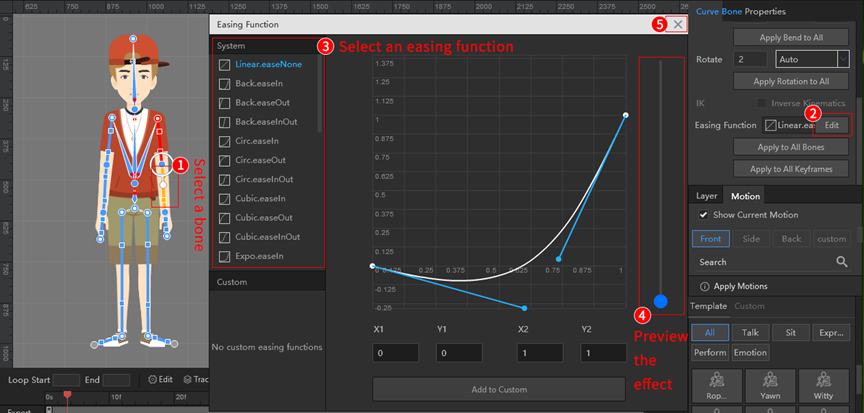
1. Using the system’s preset easing function
(1) Select a bone of the character;
(2) Click on the [Edit] button of the Easing Function in the properties panel;
(3) Select an easing function from the system list;
(4) Preview the easing function effect;
(5) If the effect is as expected, click [X] to exit, otherwise select another easing function and preview the effect.
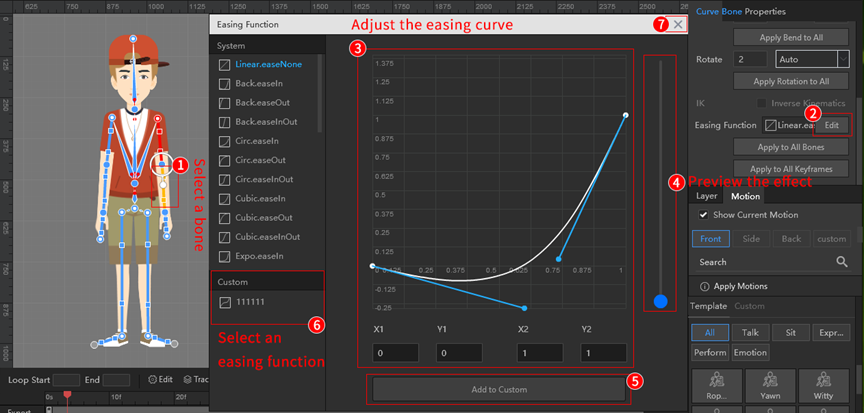
2. Using custom easing functions
(1) Select a bone of the character;
(2) Click on the [Edit] button of the Easing Function in the properties panel;
(3) Drag the control points to adjust the easing curve;
(4) Preview the easing function effect;
(5) If the effect is as expected, click on the [Add to Custom] button to add to the custom easing function area;
(6) Select an added custom easing function;
(7) Click [X] to exit the Easing Function window.


 Slovenščina
  English
  Español
  Português
  Deutsch
  Français
  繁體中文
繁體中文  Italiano
  한국어
한국어  Русский
  Română
  Polski
  Nederlands
  العربية
  日本語
日本語  Dansk
Dansk  Tiếng Việt
  עִבְרִית
  Hrvatski
  Čeština
  Magyar
  Türkçe
  ไทย
ไทย  Bahasa Indonesia