
Here are 2 methods to add the texts for users.
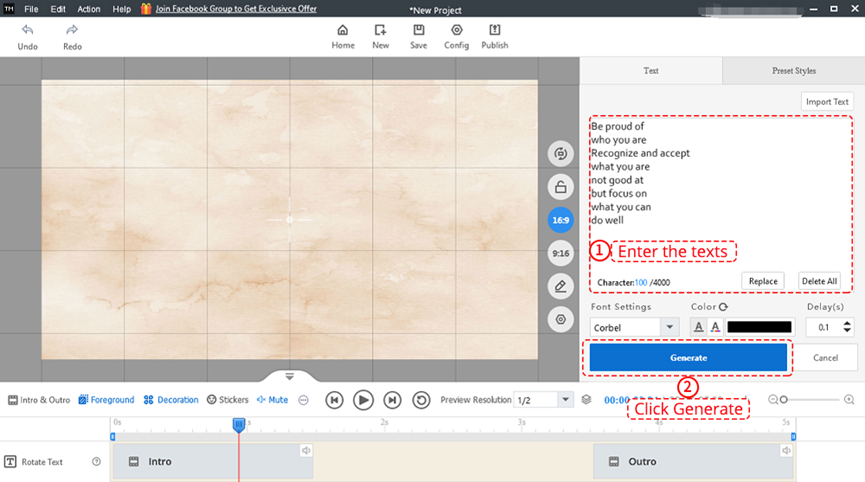
1. Enter the texts directly in the text panel
Enter the texts in the text panel and click [Generate].
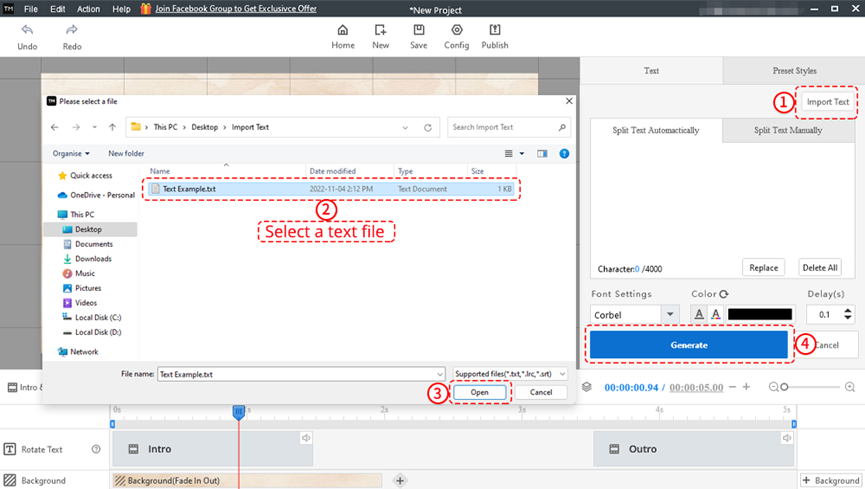
2. Import a text file
Click [Import Text] in the right panel. Select a text file and click [Open]. After importing the texts, click [Generate].


 Hrvatski
  English
  Español
  Português
  Deutsch
  Français
  繁體中文
繁體中文  Italiano
  한국어
한국어  Русский
  Română
  Polski
  Nederlands
  العربية
  日本語
日本語  Dansk
Dansk  Tiếng Việt
  עִבְרִית
  Čeština
  Magyar
  Türkçe
  ไทย
ไทย  Slovenščina
  Bahasa Indonesia