
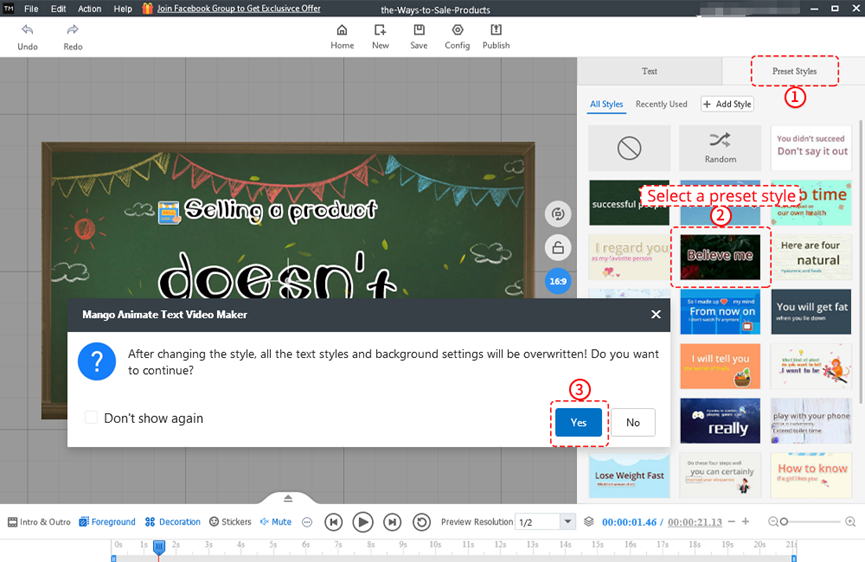
Mango Text Video Maker offers users different kinds of preset styles. Apply them only with a simple click.
1. Click [Preset Styles] on the editing page.
2. Click to select a preset style.
3. Tap on the option [Yes] in the pop-up window.
After changing the style, all the text styles and background settings will be overwritten.
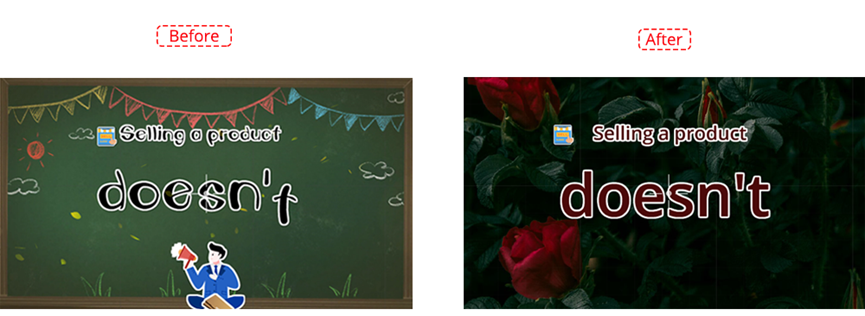
Before and after applying the preset style:


 Français
  English
  Español
  Português
  Deutsch
  繁體中文
繁體中文  Italiano
  한국어
한국어  Русский
  Română
  Polski
  Nederlands
  العربية
  日本語
日本語  Dansk
Dansk  Tiếng Việt
  עִבְרִית
  Hrvatski
  Čeština
  Magyar
  Türkçe
  ไทย
ไทย  Slovenščina
  Bahasa Indonesia